Agent Watch

Remote control for AI agents

Remote control for AI coding agents

Your agents never stop working. You can finally step away.

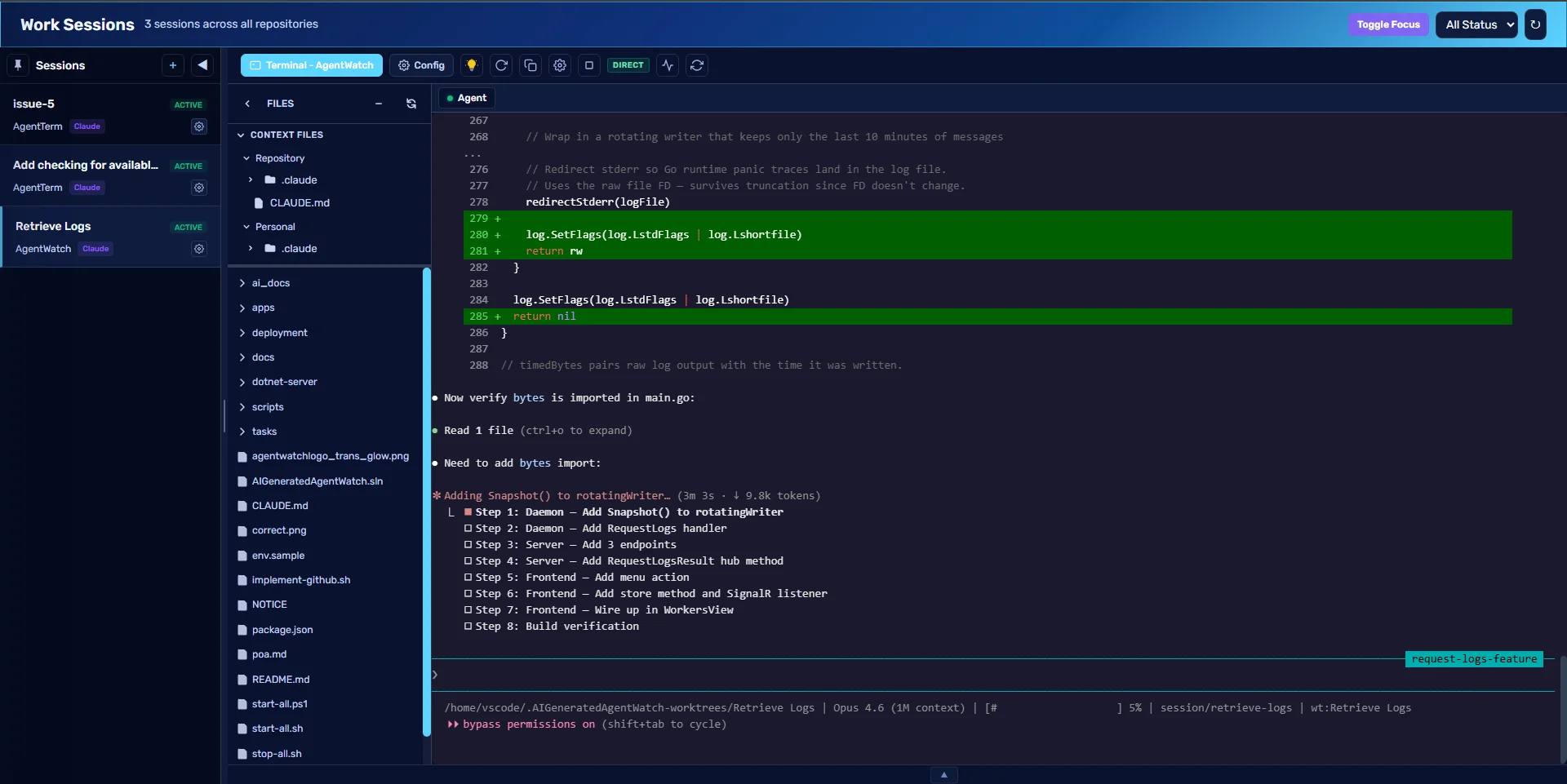
Agent Watch puts every Claude Code, Codex, and Gemini session on every machine you run onto one screen. See which agent is working, which has stopped, and which is waiting on you, then answer it from any browser.

Works with the agents you already run

  • Claude Code
  • Codex CLI
  • Gemini CLI
  • Plain SSH shell

Access Agent Watch

Sign in to your agent dashboard

Pick up where you left off.

New accounts start with a 7-day trial. After it ends you can still sign in, but features are limited until billing is updated.
Work Sessions view with three active agent sessions, a file tree, and a live agent terminal

How it fits together

One small client on each machine. One screen for all of them.

The agents stay where your code is. Agent Watch connects them to you.

Your machines

  • Laptop or workstation
  • Cloud server
  • Docker workspace per repository

Linux, macOS, and Windows. The client starts automatically and updates itself.

Agent Watch

  • Live status of every session
  • Browser terminal, files, and editor
  • Workflows, config sync, token usage

Terminals connect peer to peer where they can, with a relay as fallback.

You, anywhere

  • Desktop browser
  • Phone browser with touch keys
  • Slack, Teams, Discord, SMS

Nothing to install on the device you watch from.

Remote control

A real terminal, in your browser

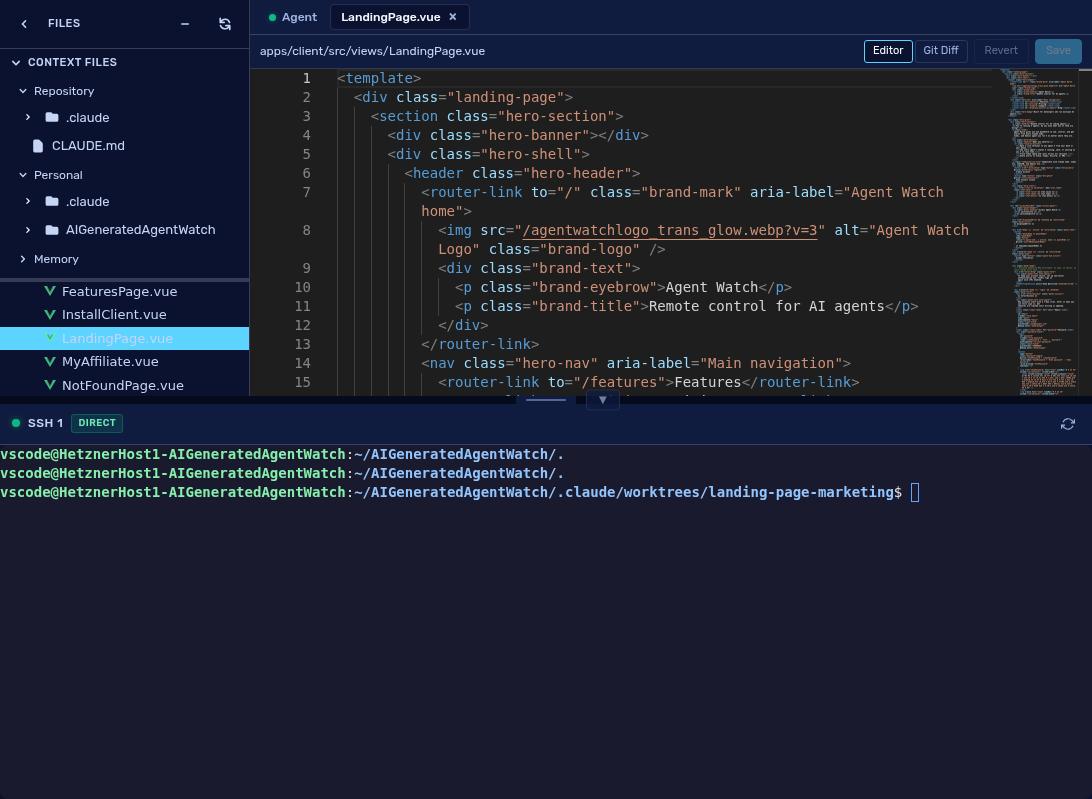
Open any session and type. The agent, a shell, the file tree, and a code editor sit side by side.
  • Sessions keep running when you close the tab and replay the screen when you return.
  • Each session can run in its own git worktree, so agents do not collide.
  • Edit files and review git diffs without leaving the page.
  • Paste an image straight into the agent.
Split workspace with file tree, code editor, and SSH terminal

Attention

Know the moment an agent needs you

Agent Watch reads each agent's hooks, so it can tell working from stopped from waiting on a permission prompt.
  • Sessions that are waiting on you are flagged across the whole app.
  • A sound for each kind of event, so you hear it without looking.
  • A message in Slack, Microsoft Teams, Discord, or by SMS when an agent stops.
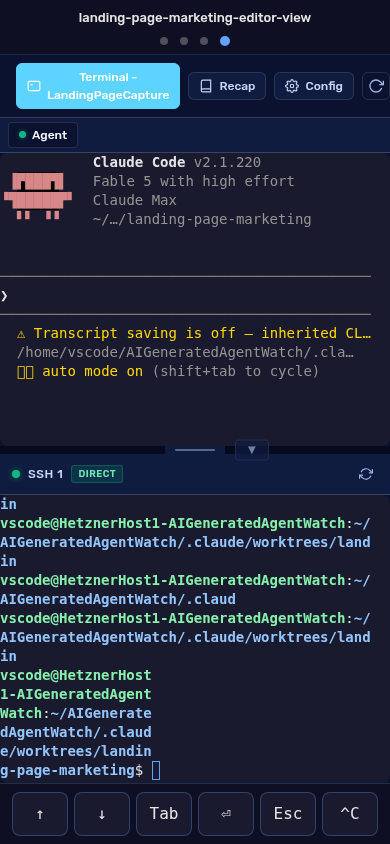
  • Answer from your phone with on-screen Tab, Enter, Esc, up and down arrows, and Ctrl-C.
Phone view of an agent terminal with a touch toolbar for answering prompts

Autonomous workflows

Label an issue. Come back to a pull request.

A workflow runs a team of agent roles through the job in phases, and checks the evidence before it calls anything done.

  • Picks up GitHub issues you mark as ready for development.
  • Failed phases are retried, and stuck runs are handed back to you.
  • Opens the pull request when every phase passes.
  • Runs that fail or change nothing are labelled on the issue, never passed off as done.
  1. GitHub issue marked ready
  2. Planner
  3. Generator
  4. Evaluator
  5. Test runner
  6. Evidence reviewer
  7. Pull request

Fleet and workspaces

Every machine, in one list

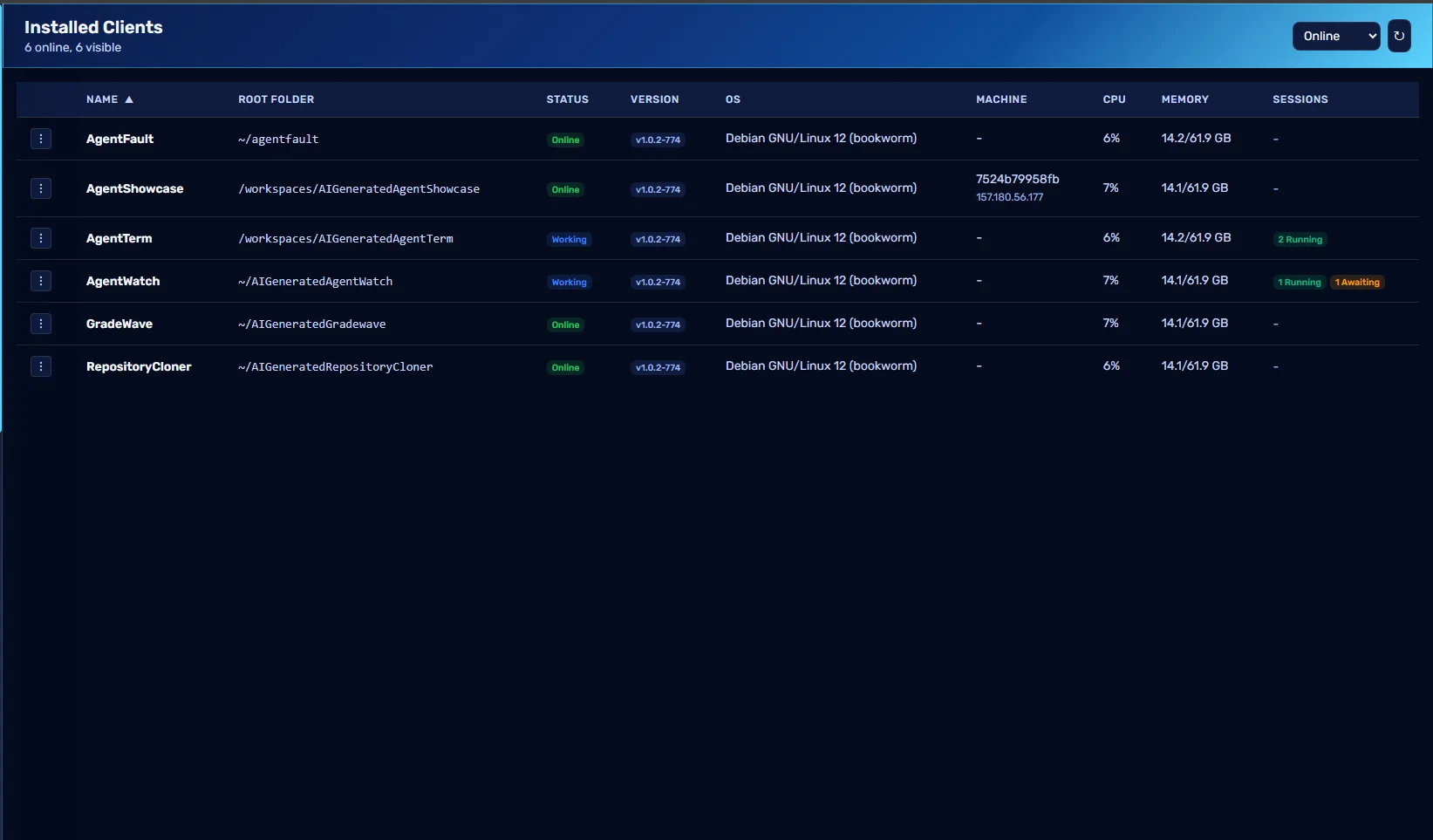
See what is online, what version it runs, and how many agents it is carrying.
  • Launch a Docker workspace per repository on a host you enrol.
  • Workspace images are built on your host from a signed manifest.
  • Clone private repositories from GitHub, Gitea, or Bitbucket Cloud.
  • Workspaces can join your Tailscale network.
Installed Clients table listing online machines with status, version, load, and running sessions

The rest of the toolkit

More than a terminal.

Config sync

Instructions, skills, rules, and slash commands follow you to every machine, written in each agent's own format, with version history and rollback.

Session recap

One summary of what the agent discussed, planned, committed, and opened as a pull request.

Searchable conversations

Every transcript is kept and searchable, so last week's decision is a query away.

Session groups

Drag sessions into coloured groups and filter the sidebar when the count climbs.

Token usage

Input and output tokens for each session, collected from Claude Code and Gemini telemetry.

Teams

On the Corporate plan, invite your whole company onto one subscription and manage roles in one place.

Security

Built for the access you are handing over.

A tool that can type into your terminals has to be hard to break into. That is where the design starts.

Two-factor sign-in for everyone

Authenticator app, SMS, or emailed code, with recovery codes. It is not optional.

Post-quantum encryption at rest

Stored secrets are sealed with ML-KEM-768 and AES-GCM.

Hybrid post-quantum TLS

Connections negotiate X25519 with ML-KEM-768 from the edge to the origin.

Signed client binaries

Every release carries Ed25519 and ML-DSA-65 signatures.

Pricing

Simple pricing. Free to try.

Free Trial

$0for 7 days

All features, 1 user

Annual

$50/year

1 user, save 40% vs monthly

Corporate

$500/month

Unlimited users

See full pricing and FAQs →

FAQ

Frequently asked questions

Ready when you are

See what your agents are doing. Right now.

Create an account, install the client on a machine, and every agent on it shows up here.